Overview
FIRST® is a non-profit organization that inspires young people to be science and technology leaders through 4 age based robotics programs. These programs involve volunteer adult members to lead and support youth teams as well as event based activities.
Each age-based program has their own dedicated web sections for the creation and management of teams, volunteering, and events.
Project Summary

Role
Lead UX Designer

Responsibilities
UX & UI Design, Prototyping, Usability Testing

Collaborators
Product Management, Software Development, Program Managers

Deliverables
Usability Evaluation, Task flow Diagrams & Analysis, Designs, Prototyping, Usability Testing Moderation & Reporting

Outcome
Reduction in time to build and manage robotics teams, faster organization of event schedules and volunteer assignments, improved team analytics through data visualizations and content strategy
The Challenge
I was brought in on a tight timeline to evaluate and improve the logged-in user experience—where teams are created and managed, and volunteers and youth members enroll. The effort was driven by negative feedback on the recently launched Team Registration section, which users found difficult to navigate when preparing for the upcoming season.
Usability Evaluation
The purpose of the review was to identify areas that contribute to poor usability of the current design, to provide an organized list of issues, their relative severity as it pertains to user experience, and to identify recommended mitigation strategies. This revealed inconsistent use of components and interaction models, navigation and page layouts that did not support user-centered task flows, and missing data needed for efficient and informed decision making.
Task flow creation
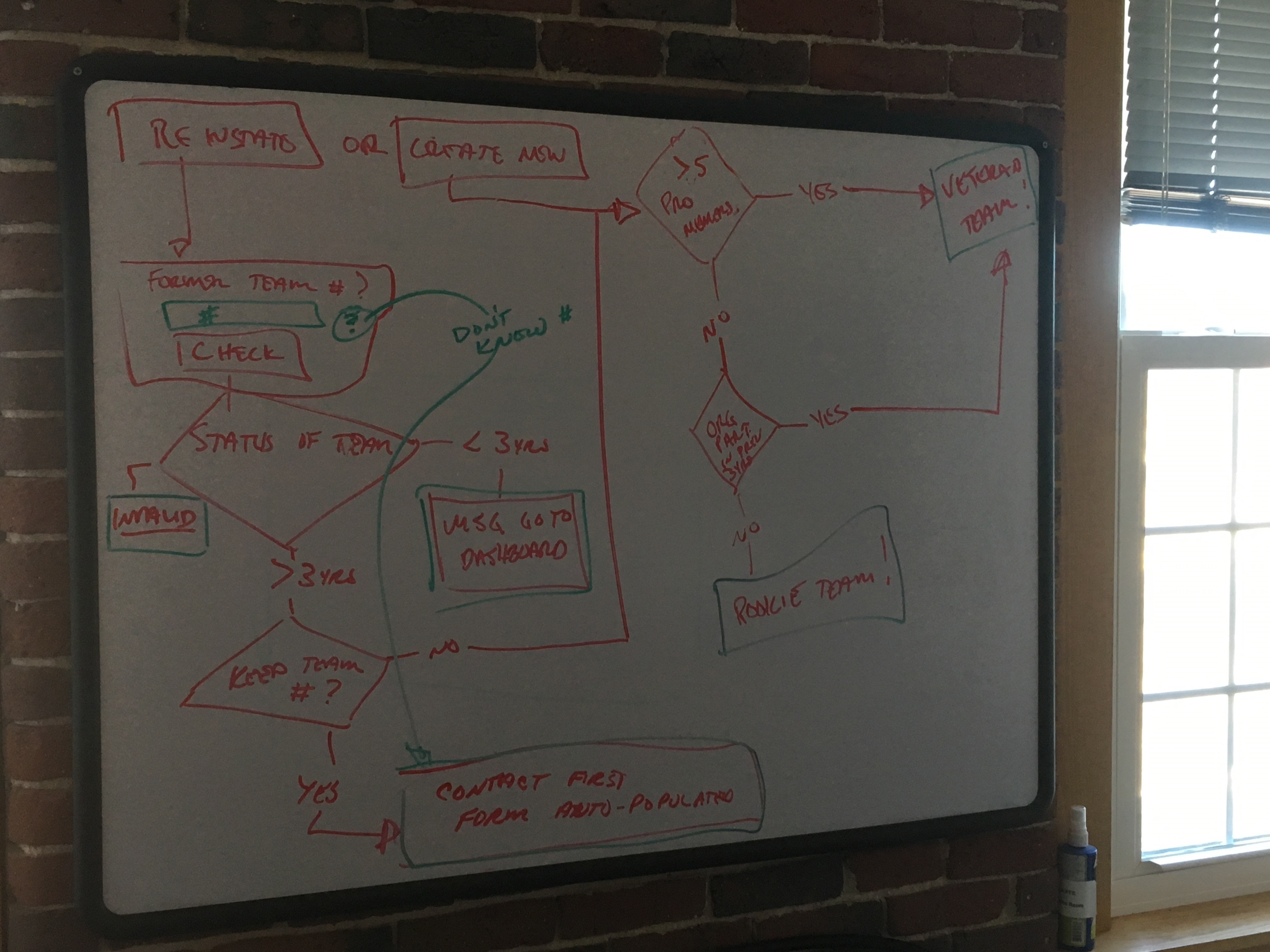
After reviewing the site, it was necessary to reevaluate the workflows for various key tasks. This was done through white board sessions with Product Owners and Lead Developers to incorporate business requirements as well as feasibility and risk. By mapping these out, it was then possible to refine them to improve the user experience by eliminating unnecessary steps.

Prototype Creation
Due to the compressed schedule, design concepts were created directly in the prototype tool surpassing low fidelity wireframes. High visibility and regular reviews ensured the design effort stayed aligned with key stakeholder goals and user needs.
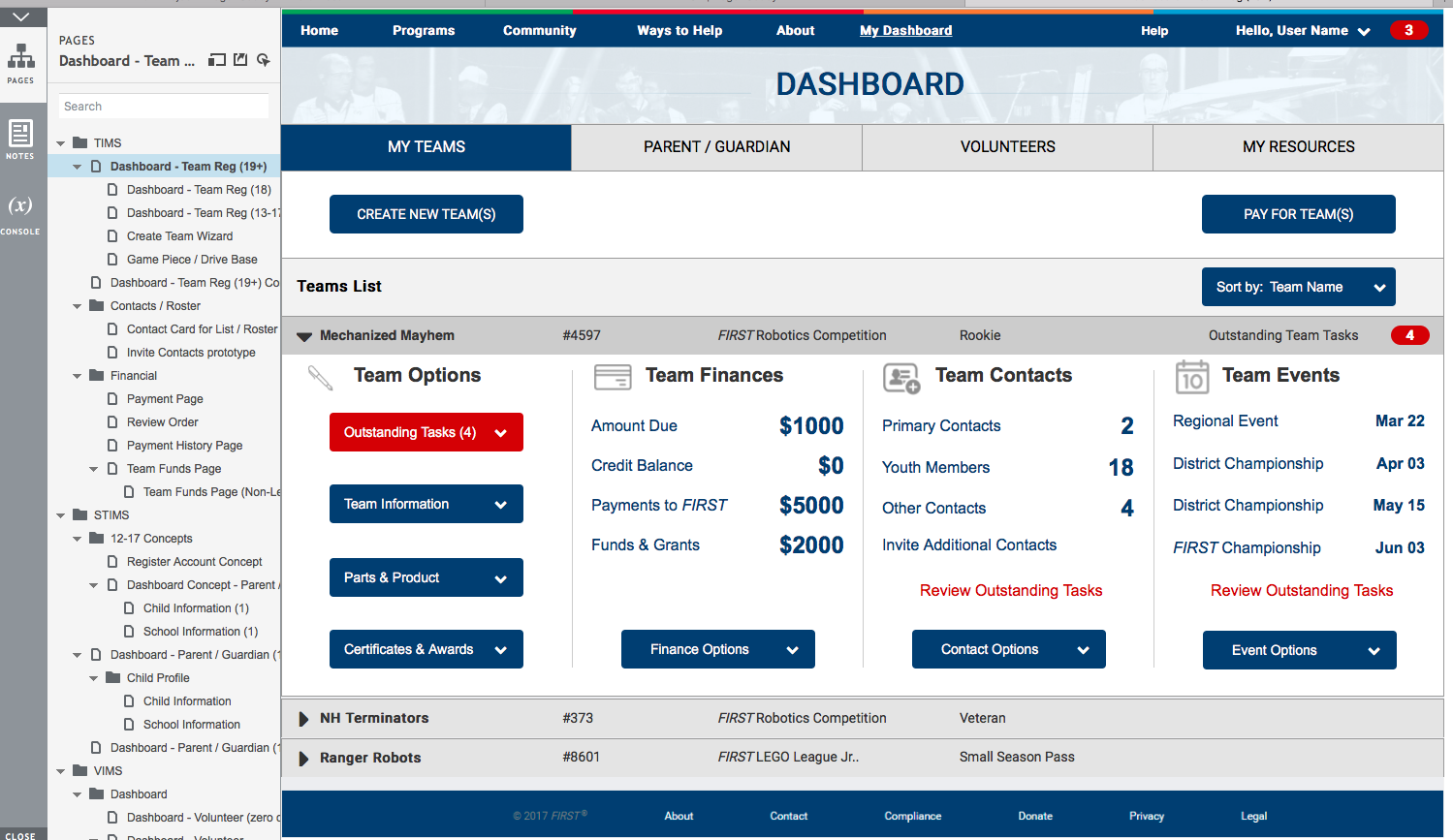

I used Axure RP for this project and due to development constraints with implementing a flexible grid, I designed three adaptive layouts for desktop, tablet and mobile. By using an interactive prototype, we were able to iterate through the review process faster while supporting the needs for upcoming usability testing.
Usability Testing
5-8 users were recruited for usability testing of each website subsection. I worked with product owners to define hypotheses and identify the key tasks for user to perform to obtain what we wanted to learn from the testing. After which, I created a moderator guide that scripted the task flow and follow up questions.
The testing was conducted remotely using GoToMeeting, a combination of role based user accounts seeded in a development build and the Axure prototype. It was great that key stakeholders were able to observe the testing as their observations and feedback on the tests were quite valuable during the debrief. I recorded each test session and captured everyone’s observations in a spreadsheet.
After the testing was completed, all findings and observations were distilled into a formal report for each specific section of the website that was being tested. The output was reviewed with the team and any areas we wanted to iterate on were identified, defined, estimated, and prioritized in an agile backlog for future sprint planning.
You must be logged in to post a comment.